

China Barcode Wristband Printer Guide: Choosing the Right System for Your Needs
2026-06-25
In China's fast-paced healthcare and event management scenes, barcode wristband printers have become essential for accurate identification and streamlined workflows. But with so many options flooding the market, how do you pinpoint the right system that balances reliability, speed, and cost? From thermal print technologies to integration with hospital information systems, every detail matters—especially when a single misprint can delay patient care or compromise event security. Enter BAOBI, a brand that's been quietly powering some of the most demanding environments. In this guide, we cut through the noise to help you choose a barcode wristband printer that aligns perfectly with your operational needs, whether you're labeling newborns or managing VIP access at a stadium. Read on to discover the key factors that separate a wise investment from a costly mistake.
Why Barcode Wristbands Are Redefining Patient Safety in Chinese Hospitals
In the bustling corridors of Chinese public hospitals, where patient turnover can exceed thousands per day, the margin for human error has always been razor-thin. Nurses often juggle dozens of medication rounds, specimen collections, and bed transfers within a single shift. Before barcode wristbands, patient identification relied heavily on manual checks—reading bed cards, cross-referencing paper charts, or simply asking the patient’s name. In a hectic ward, a split-second misread could lead to a near miss or worse. The integration of barcode wristbands directly addresses this fragility by making the patient’s identity instantly machine-readable, trimming those critical seconds and drastically cutting the risk of mix-ups that once felt inevitable in such high-pressure environments.
Barcode wristbands have turned routine tasks into verification checkpoints. When a nurse scans a wristband before administering medication, the system cross-checks the drug, dosage, and timing against the patient’s electronic record—and flashes an alert if something doesn’t match. The same principle applies to blood draws: a mismatch between the wristband and the labeled sample tube is caught before the needle ever touches the skin. In operating theatres, a quick scan becomes part of the surgical safety checklist, ensuring the right patient is on the table for the right procedure. These real-time safeguards have woven a layer of digital vigilance into everyday workflows, catching errors that tired eyes might otherwise overlook.
What makes the Chinese adoption unique is how seamlessly these wristbands have merged with the country’s rapidly digitizing hospital information systems. The barcode often serves as a single key that unlocks a patient’s entire medical journey—from registration and triage to discharge and billing. In some hospitals, family members can scan a wristband to view real-time updates on a patient’s surgery progress or lab results, adding a layer of transparency that builds trust. This holistic connectivity not only streamlines operations but also generates a rich trail of data that hospital administrators can mine to pinpoint bottlenecks and improve care protocols, pushing patient safety from a reactive culture to a proactive, data-driven one.
Core Printer Technologies That Shape Your Wristband Durability
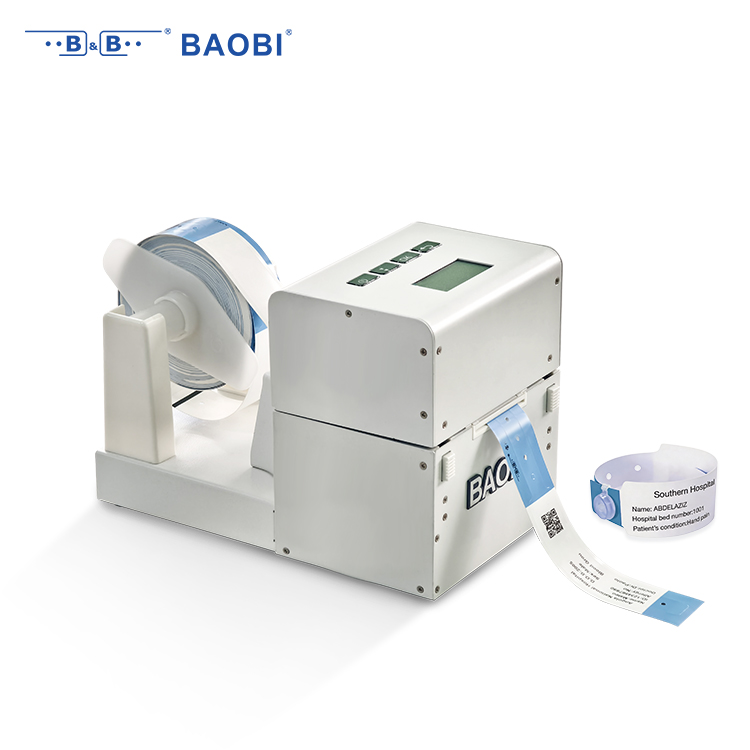
The durability of a printed wristband often hinges on how the ink interacts with the material at a microscopic level. Thermal transfer printing, for instance, uses a heated ribbon to bond resin or wax-based ink directly into the wristband's fibers. This fusion creates a barrier that's highly resistant to sweat, sunscreen, and daily friction—much more so than surface-level printing methods. By choosing ribbons engineered for synthetic materials, the print becomes part of the band itself, surviving stretching, water immersion, and prolonged wear without flaking or fading.
UV-curable inkjet technology takes a different route, offering vivid full-color graphics that harden instantly under ultraviolet light. The cured ink forms a flexible, abrasion-resistant layer that holds fast to vinyl, polyester, or Tyvek wristbands. Adjusting the ink’s elasticity to match the substrate prevents cracking when bands are pulled taut over a wrist. This method shines in event settings where visuals matter but bands must endure several days of active use—think music festivals or multi-day conferences.
Laser etching brings yet another dimension, especially for fabric or vinyl wristbands destined for high-end or extended-wear applications. Instead of adding ink, it alters the material’s surface to create a permanent, smudge-proof mark. The contrast and depth can be tuned so text remains legible even after exposure to chlorinated pools or repeated sanitizing. When paired with woven fabrics, laser-etched details become nearly indestructible, making this a go-to for VIP passes, resort bands, or any scenario where the wristband must outlast the event itself.
Matching Print Volume to Printer Duty Cycles Without Overpaying
Many businesses treat duty cycle recommendations as firm ceilings, when they’re really just broad-brush estimates. A printer rated for 50,000 pages a month isn’t necessarily happy cranking out that volume day in, day out—it’s a limit that assumes perfect conditions and light coverage. Instead of fixating on the maximum, look at your actual monthly output and aim for a machine whose recommended monthly volume envelops that number with room to breathe. This way, you avoid both the strain of constant peak operation and the trap of buying more printer than you’ll ever need.
Print speed and duty cycle often get tangled into one purchase factor, but they serve different purposes. A fast engine with a low duty cycle can be fine if your jobs are small and frequent, but it’ll struggle under sustained heavy loads. On the flip side, a high-duty-cycle workhorse that prints slowly might create frustrating bottlenecks. Match the pace of your workday to both metrics: if your team prints in bursts between meetings, prioritize speed; if they churn through lengthy reports in long, steady runs, durability and monthly volume matter more than a few extra pages per minute.
Overpaying doesn’t just happen upfront—it hides in toner costs and service contracts designed for equipment that’s rarely pushed. When you right-size your printer to your genuine print volume, you often fall into a lower cost-per-page bracket and can skip premium service plans built around 24/7 uptime. Grabbing a machine that comfortably handles your peaks without demanding a premium for unused capacity means your budget stays lean, and your printer spends less time nursing mechanical fatigue and more time quietly doing its job.
Overlooked Features That Make Daily Workflows Smoother
It’s funny how the smallest tweaks can end up saving the most time. That little arrow in the corner of a folder that remembers exactly where you left off—it’s not flashy, but it spares you from digging through layers of menus every single time. Or the way your device silently learns which apps you reach for at certain hours, so they’re just… there when you need them. These aren’t the headliners, but they quietly erase friction you’d stopped noticing.
Some tools have a knack for making repetitive tasks feel less like chores. You know that moment when you realize you can drag a file straight into an email without opening a separate uploader? Or when a chat app lets you pin a message so it stays perched at the top for days, refusing to let that address or code snippet get buried? It’s the digital equivalent of a well-organized desk—no one compliments it, but everyone works better because of it.
What’s wild is how these features often hide in plain sight. A long-press here, a two-finger swipe there—gestures that were probably demoed once and then forgotten. But once they become muscle memory, they feel indispensable. It’s not about overhauling your entire workflow; it’s the small, quiet additions that keep the gears turning without a grind.
How to Test Material Compatibility Before You Commit
Start by grabbing small samples of the materials you’re considering—cut-offs, swatches, or even a hidden section of the actual product. Expose them to the conditions they'll face in real use: rub them together, soak them in the expected fluids, or leave them in a warm, humid spot for a few days. A quick soak test with the chemicals or cleaners you plan to use can reveal softening, discoloration, or surface tackiness that data sheets won’t mention. If something feels off—too slippery, too sticky, or starts to smell strange—trust that gut check before moving forward.
Pay close attention to how the materials interact under stress. Combine them in a clamp or press them together under a weight that mimics real-world load, then check for indentation, creep, or any sign of bonding. Sometimes two perfectly stable materials will cold-weld or chemically fuse when held tightly in contact, especially with a bit of heat. You can also accelerate this by cycling the temperature a few times—an hour in the freezer followed by an hour in a warm oven can simulate months of seasonal changes and flag potential cracking or delamination early.
Don’t skip the simplest test: just leave the materials in your intended workspace or storage area and wait. Dust, stray UV from a window, or even the off-gassing of nearby plastics can quietly ruin a surface over time. Check back after a week or two with a bright light and a magnifier. If possible, run a small pilot assembly using the actual fasteners, adhesives, or sealants to see if everything holds together as expected. That hands-on trial will catch fitment issues or unexpected reactions that a spec sheet comparison would never anticipate.
Hidden Costs No One Talks About When Upgrading Your System
When planning a system upgrade, most budgets focus on hardware and software licenses, but the true financial drain often lies in unanticipated integration and compatibility issues. Existing peripherals, legacy applications, or even custom scripts may suddenly fail to work after the update, forcing teams to spend days or weeks troubleshooting. These hidden labor hours quickly add up, eating into productivity and stretching project timelines far beyond initial estimates.
Another silent expense is the learning curve that comes with any new interface or workflow. Employees need time to adapt, and during that transition, efficiency dips noticeably. Without dedicated training resources, mistakes become more frequent, leading to data errors or repeated tasks that undercut the very efficiency gains the upgrade promised.
There’s also the overlooked cost of increased support demands. Help desk tickets spike after an upgrade as users encounter unfamiliar errors, password resets, or configuration snags. Unless your support capacity scales accordingly, response times lag and frustration mounts, creating a hidden drain on both morale and operational resources.
FAQ
Barcode wristband printers are specifically designed to produce durable, comfortable bands that can withstand moisture, friction, and daily wear. Unlike standard label printers, they handle flexible materials and often include features like antimicrobial coatings, adjustable sizing, and direct-to-wristband printing that ensures crisp, long-lasting barcodes for patient or event use.
Many Chinese manufacturers have honed their production efficiency and offer competitive pricing without sacrificing core functionality. You often get access to a broader range of customizable options, from print resolution to material choices, and the ability to scale orders quickly—making it a pragmatic choice for hospitals, festivals, or logistics hubs with tight budgets and specific demands.
Look beyond the print speed. Pay attention to the flexibility of media handling—can it switch between different wristband types easily? Evaluate the durability of the printed bands, battery life for mobile units, and how intuitive the accompanying software is. Also consider if the system integrates smoothly with your existing databases or check-in platforms to reduce manual data entry.
Direct thermal is popular for short-term use because it’s simple and doesn’t need ribbons, keeping costs low. However, if the wristbands must endure alcohol swabs, hand sanitizers, or extended wear, thermal transfer with resin ribbons yields text that resists fading and smudging far better—crucial for accurate patient scanning over multiple days.
Clarify the exact material specs, including barcode verification reports, before committing to a large batch. Request sample prints with your actual data to test scan reliability under real conditions. Also, double-check compatibility between the printer’s language settings and your network infrastructure, and agree on a clear timeline for firmware updates or technical troubleshooting.
Yes, many modern models come with adjustable media guides and sensors that auto-calibrate for different widths and thicknesses. The key is to test the feeding mechanism with the slim, softer materials used for infants—some printers struggle with lighter synthetics, so if your workflow mixes patient demographics, prioritize models with proven dexterity across sizes.
Conclusion
In China's fast-evolving healthcare landscape, barcode wristband printers have become essential for eliminating identification errors and streamlining patient throughput. The shift toward automated verification directly tackles the risks associated with manual data entry, especially in high-volume public hospitals where even a minor misidentification can trigger serious care setbacks. Rather than simply printing labels, today's systems must endure rounds of hand sanitizer exposure, skin friction, and long shifts without fading—meaning the choice between direct thermal and thermal transfer technologies shapes everything from scannability to long-term legibility. Pairing printer duty cycles with real-world admission peaks prevents mid-morning breakdowns, while quieter thermal designs and fast ribbon swaps spare nursing staff unnecessary distractions during dense rounds.
Beyond upfront hardware costs, true value hides in how easily a printer handles local media stocks and variable wristband dimensions without jamming. Running a small batch of your actual wristbands and hand-sanitizer wipes through a demo unit reveals adhesive compatibility and smear resistance that spec sheets ignore. Overlooked features, like auto-cutter alignment, multilingual driver support for domestic health IT platforms, and transparent ribbon-level indicators, remove daily friction for ward clerks who may not be technical specialists. Finally, factor in the ongoing expense of printheads and certified consumables, as well as the vendor's turnaround time for on-site service in provincial areas—these silent budget drains often outweigh the initial purchase price and determine whether your system stays dependable under real-world pressure.
Contact Us
Contact Person: Bill Xu
Email: [email protected]
Tel/WhatsApp: 8618688898707
Website: https://www.baobitech.com/