

HDMI Cable Manufacturer Checklist for Reliable High-Speed Video Transmission
2026-11-16
Two HDMI cables can share the same spec sheet and look identical in a store, yet one delivers clean 8K video while the other drops out under load. That gap comes from choices made on the factory floor: conductor gauge, shielding coverage, termination quality, and how honestly each cable is tested. Before you trust a cable with high-speed video, use this checklist to see what separates a dependable build from a gamble—and why EBCYX holds every production batch to stricter limits.
What Actually Keeps a High-Speed HDMI Signal Stable
A stable high-speed HDMI link rarely comes down to a single premium ingredient. Most of the work happens before the signal reaches the connector. The twisted pairs carrying data must keep their impedance nearly constant along the entire run. Even a slight crush, kink, or uneven insulation thickness can send part of the signal back toward the source, and at 18Gbps or 48Gbps those reflections close the receiver's eye pattern quickly. That is why better cables often use mechanically foamed dielectrics and tight pair geometry rather than just thicker jackets or gold-plated shells.
The receiver side is just as active. Modern HDMI chips don't simply measure voltage; they sample the incoming waveform, apply equalization to lift the high-frequency edges, and retime the data against a recovered clock. This is what lets a marginal cable still work in a short cabinet run while the same cable fails over three meters. It also explains why firmware and silicon quality matter more than raw conductor purity once the cable gets past basic electrical compliance.
Grounding and shielding play quieter roles. A shield that is terminated too aggressively at both ends can create a low-impedance loop that couples noise into the very lines it is meant to protect. In practice, stable high-speed HDMI depends on controlled differential pairs, clean connector transitions, and a receiver that can compensate for expected losses without amplifying noise.
The Physical Details That Separate Dependable Cables from the Pack
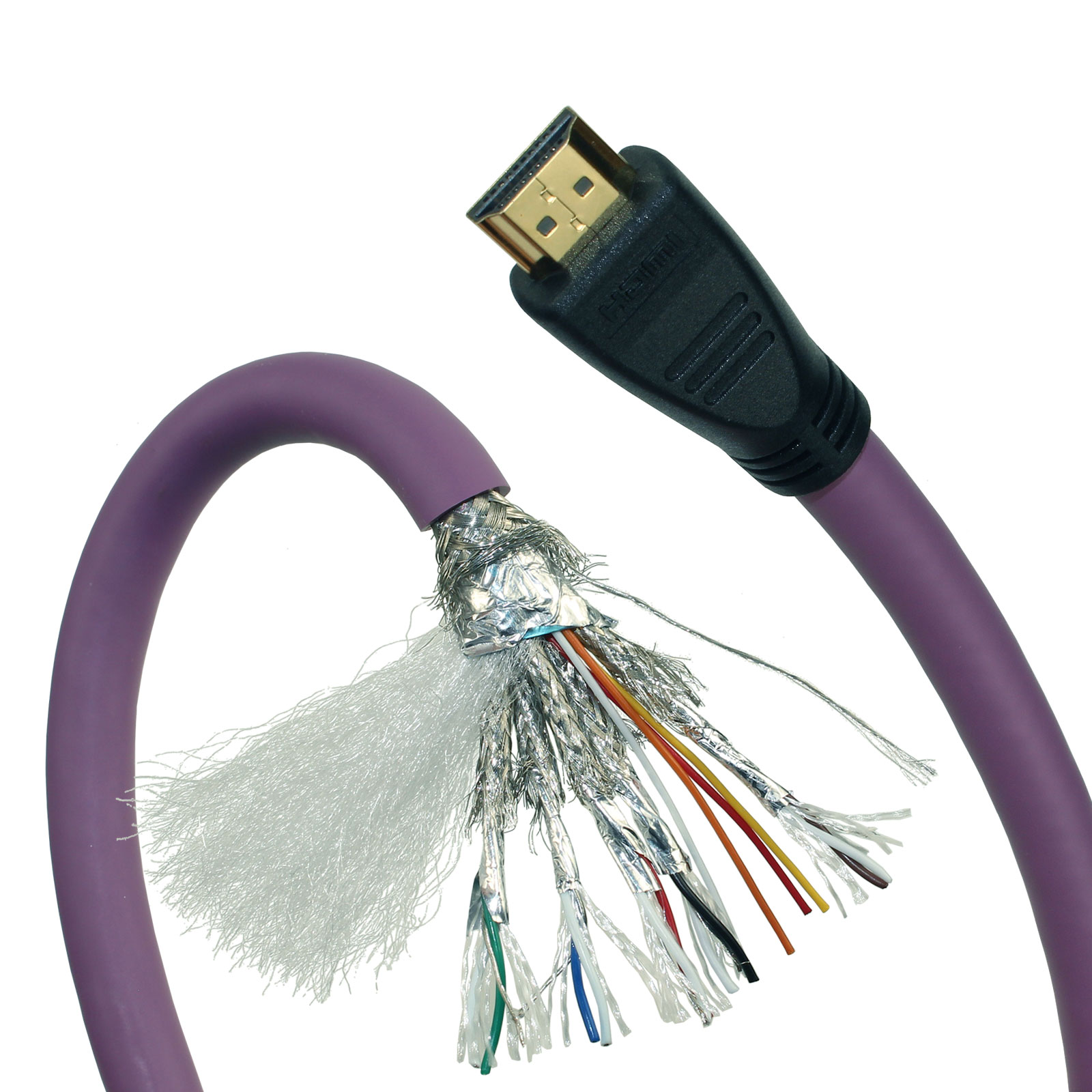
Peel back the outer jacket on a dependable cable and the first thing you notice is how tightly the conductor strands are bunched. Manufacturers chasing cost often skip the extra tinning or use fewer, thicker strands that fatigue after repeated flexing. A cable built for daily use tends to use fine stranded copper with a clean, even tinning, because that slows corrosion at the terminations and lets the cable survive constant bending without turning stiff.
The jacket itself tells you a lot before you even strip it. On a well-made cable the outer sheath feels dense but not greasy, and it springs back after you pinch it. That usually points to a higher-grade PVC or TPE compound with enough plasticizer to stay flexible in cold weather but not so much that it leaches out and hardens. Inside, look for a braided shield with tight coverage rather than a sparse spiral wrap; poor shielding leaves gaps that invite interference, and the foil layer should be bonded to the jacket so it does not tear when the cable is pulled around a corner.
Strain relief at the connector is another giveaway. A beefy boot that tapers gradually and grips the jacket prevents the weakest point from becoming a break after a few months in a bag. Small touches like clear jacket legends, uniform thickness, and plugs that sit square with the cable also signal better tooling and tighter tolerances. These are not glamorous features, but they are the physical clues that separate a cable that lasts from one that merely looks the part.
Why Bandwidth Claims Alone Do Not Guarantee Clean Video
A speed test result can look generous while the actual video path struggles. Bandwidth measures capacity, not steadiness. Packets can arrive in bursts or get dropped at a congested switch, and the player has to either pause or fill the gaps with guesses. When that happens, the picture breaks up even though the connection had more than enough raw throughput.
Live and low-latency streams are especially unforgiving. Jitter and late packets force the decoder to retime or skip frames, and visible smearing or blocking appears long before the bitrate meter shows a problem. A link that averages 30 Mbps can still stumble if it briefly collapses during peak traffic or if Wi-Fi retries delay a critical slice of the frame.
In practice, clean video depends on stable latency, very low packet loss, and enough headroom for recovery. Bandwidth alone cannot fix a noisy uplink or a router that buffers too aggressively. It just means you can receive damaged data at a higher speed.
Wear, Heat, and Bend Tests That Reveal Long-Term Weaknesses
Most product failures don't happen on day one. They show up weeks or months later, after repeated flexing, thermal cycling, and surface friction have quietly done their damage. Wear tests simulate that slow grind—rubbing contact points, rolling hinges, or dragging cables across rough edges—to see which materials hold their shape and which start shedding particles or developing grooves. The goal isn't just to measure how much material disappears, but to catch the moment when a surface becomes rough enough to cause noise, binding, or premature failure elsewhere in the assembly.
Heat exposure reveals a different kind of weakness. Components that feel solid at room temperature can warp, soften, or delaminate once they spend hours near a heat source. A plastic latch might lose its spring tension. An adhesive bond can turn gummy and let go. Thermal cycling makes it worse—expanding and contracting joints until tiny cracks open up and grow. Bend tests push that same idea through mechanical fatigue: fold a living hinge thousands of times, twist a connector housing, or flex a ribbon cable until the copper traces inside start to fracture. The failures are rarely dramatic at first. A hairline crack, a slight permanent set, a dull spot where the finish rubs off.
The real value comes from watching how these stresses combine. A part that survives pure bending might fail quickly when heat has already weakened the polymer chains. A surface that looks fine after a wear test might show micro-cracking once it's been thermally aged. Long-term weaknesses almost never come from a single stress acting alone—they emerge from the overlap, and testing that overlap is what separates products that merely work on day one from ones that still work a year later.
Matching Cables to Real Source and Display Combinations
Most cable mismatch problems come from assuming that a connector shape tells you the whole story. A laptop's USB-C port may be connected to DisplayPort alternate mode, Thunderbolt, or nothing more than USB data, and the display side might be expecting HDMI 2.1 or DisplayPort 1.4. Before buying anything, verify what the source actually outputs and what the monitor or TV can accept. Then pick a cable that explicitly supports the required bandwidth level, not just the physical plug.
Short passive cables tend to work fine for common 4K 60 Hz setups, even when the labeling is modest. The trouble usually starts with 4K 120 Hz, 8K, or long runs. A 10-foot copper HDMI cable may handle 18 Gbps without issue but become flaky at 48 Gbps. In those cases, look for Ultra High Speed HDMI certification or an active optical cable. Also think about audio paths: if the sound is traveling back from a TV to an AV receiver through eARC, the cable needs to support the HDMI Ethernet Channel pins, because an old high-speed cable may not complete that handshake reliably.
After connecting everything, don't trust the operating system alone. Open the display's on-screen menu and check the actual signal details. If you see YCbCr 4:2:0 at a lower refresh rate than expected, or if the screen briefly drops out during scene changes, the cable is usually operating at the edge of its capability. Swapping to a shorter, properly rated cable often clears up intermittent black screens and color banding more effectively than updating drivers or adjusting software settings.
Questions Worth Asking Any Cable Manufacturer Before Ordering
It’s easy to fixate on unit price, but a cable order lives or dies on details that rarely show up in a quote. Before signing anything, ask the manufacturer to walk you through where the copper or aluminum actually comes from, how the insulation compound is selected for your temperature range, and whether the jacket will hold up under UV, oil, or repeated flexing. If the answers stay vague or the sales contact has to check with the plant for basic material questions, that delay will repeat itself later.
Push beyond standard lead time promises. Find out how the schedule changes when a drawing revision lands mid-production, what their actual minimum order quantity means for a pilot run, and whether they keep buffer stock of common gauges or make every reel from scratch. A manufacturer that can explain the bottleneck instead of just quoting a date is usually the one that will tell you the truth when a shipment slips.
Testing deserves more than a yes-or-no question about certifications. Ask to see recent batch test data, not a sample certificate from three years ago, and ask what happens when a reel fails a spark test or dimensional check. Also clarify who owns the problem once cable leaves the dock: response time, replacement terms, and whether an engineer or a customer service rep will actually show up to the failure analysis.
FAQ
First, check whether the manufacturer can supply detailed test reports for bandwidth, attenuation, and signal integrity. Reliable suppliers usually share eye diagram results and impedance measurements for actual production cables, not just prototype samples.
Certification shows compliance with a standard, but it does not guarantee consistency across every batch. It helps to ask how often they recertify, whether they test production units, and how they handle failed lots.
Look for ratings that match your use case, such as Premium High Speed HDMI for 18Gbps or Ultra High Speed HDMI for 48Gbps. Beyond the label, pay attention to conductor gauge, shielding design, and how the cable behaves at longer lengths.
A trustworthy factory runs bit error rate tests, crosstalk checks, and return loss measurements on finished cables. Testing should happen across a range of lengths and include stress on the connectors, since failures often appear at termination points.
Request samples from separate production runs and compare them physically and electrically. Ask for batch-level test data instead of a one-time certificate. Inconsistent connector fit or slight differences in shielding can reveal weak process control.
Connectors are where signal reflections and intermittent faults tend to occur. A well-built cable uses precision-molded housings, gold-plated contacts, and secure strain relief. Poor termination can ruin performance even if the raw cable is high quality.
Shielding blocks electromagnetic interference that can corrupt high-speed signals. For long runs or crowded setups, multiple shielding layers and proper drain wire termination help maintain stable video without flickering or dropouts.
Ask about attenuation at the exact lengths you need, whether they recommend active or optical cables beyond certain distances, and what resolution and refresh rate they guarantee. A clear answer should include tested limits rather than a generic distance claim.
Conclusion
High-speed HDMI stability rarely comes from the bandwidth figure printed on the jacket. It comes from how well the cable holds impedance through bends, how the shield drain wires are terminated, and whether the connector shell actually grips the plug instead of relying on a thin solder joint. A cable that quotes 48Gbps can still produce sparkles or dropouts once it runs through a conduit next to power lines, because bandwidth alone says nothing about noise rejection or equalization headroom. The construction tells you more: tight pair twisting, consistent dielectric thickness, and strain relief that keeps solder joints from working loose matter more than a glossy spec sheet.
Long-term failures usually surface in flex, heat, and connector pull tests rather than in a quick signal generator pass. A manufacturer worth shortlisting should be able to describe how they cycle cables through repeated bending, expose them to cabinet-level heat, and measure insertion loss before and after. They should also ask about the actual sources and displays in your environment, since a cable that works on a lab pattern generator may fail handshaking with a specific AVR, gaming PC, or projector. If the vendor talks in concrete test conditions and real device pairings instead of recycling generic cable categories, that is a more useful signal than any certification badge.
Contact Us
Contact Person: David Yang
Email: [email protected]
Tel/WhatsApp: 8615814734054
Website: https://www.ebcyx.com/